
A website is not high quality simply because it loads quickly and looks good.
Real website quality is the result of multiple connected factors: technical health, structure, accessible content, working links, consistent metadata, usability and the ability of as many people as possible to interact with the website successfully.
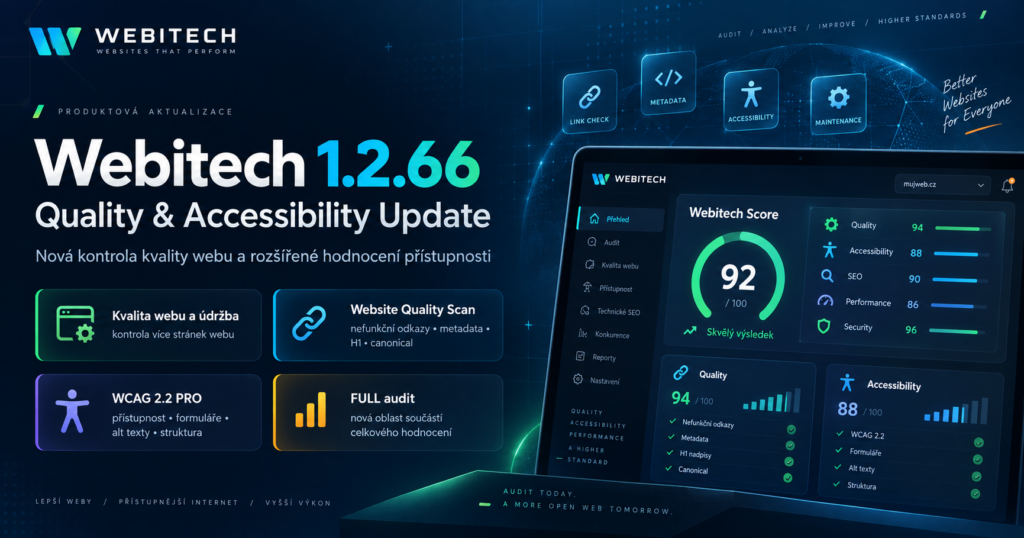
That is why Webitech 1.2.66 – Quality & Accessibility Update introduces two important improvements to our digital footprint analysis.
The first is a new Website Quality & Maintenance category that evaluates a sample of multiple pages instead of looking only at a single URL.
The second is a significantly extended WCAG 2.2 accessibility assessment, designed to detect more automatically identifiable barriers affecting people with disabilities as well as broader usability issues.
The objective is not to create two more isolated scores.
The objective is to answer a more useful question:
Is the website as a whole technically healthy, properly maintained and usable by its visitors?
New category: Website Quality & Maintenance
One correctly working homepage does not mean the entire website is healthy.
As websites evolve, problems naturally accumulate.
A page is moved.
Another one is deleted.
An older article continues to link to content that no longer exists.
Several pages use the same title.
An important service page may have no clear main heading.
These problems may not be obvious at first sight.
But over time, they can reduce user experience, complicate website crawling and weaken the overall structure of the site.
Webitech therefore now performs a limited and responsible crawl across a sample of public pages.
It is deliberately not an aggressive crawler designed to scan thousands of URLs during a normal audit.
Its purpose is to create a useful sample and detect common quality issues that may indicate insufficient website maintenance.
Broken internal links
Internal links connect different areas of a website.
When visitors click a link and receive a 404 error instead of the expected content, the experience is immediately damaged.
A single broken link does not necessarily indicate a serious website problem.
Dozens of broken links, however, can be a sign of long-term maintenance issues.
Webitech therefore checks whether sampled internal links lead to available pages and whether the server returns an expected response.
Missing and duplicate page titles
The HTML <title> element provides one of the basic descriptions of a page.
It helps both users and search engines understand what the page is about.
Problems can occur when multiple different pages use exactly the same title.
Search engines then receive a less distinct signal about the purpose of each URL.
A completely missing title can be problematic as well.
Webitech therefore checks both title availability and duplicate titles within the analyzed sample.
Main H1 heading
Heading structure helps divide content into logical sections.
The primary H1 should help visitors and machine-readable systems understand the main topic of the page.
A missing H1 does not automatically mean that a page is bad or cannot be indexed.
It is, however, a useful signal that the content structure may deserve attention.
This is why Webitech includes it as one of the website-quality indicators.
Meta descriptions
A meta description is not the only factor affecting search visibility, and search engines may decide to generate a different search snippet.
It still provides useful contextual information.
A well-written description can clearly communicate what a page offers and help improve the way the page is presented to users.
Webitech therefore evaluates meta-description coverage across the analyzed URLs.
Noindex
The noindex directive is useful.
Not every page needs to appear in search engines.
The problem occurs when noindex is accidentally applied to a page that is supposed to be public and discoverable.
A website audit should therefore not simply label every noindex directive as an error.
It should highlight where it appears and allow the website owner to determine whether the setting is intentional.
Canonical URLs
Canonical URLs help identify the preferred version of content when the same or similar content can be reached through multiple addresses.
A missing canonical is not automatically an error.
However, inconsistent or suspicious canonical configuration can make website interpretation more difficult.
Webitech therefore includes canonical information within the broader technical context of each analyzed page.
Very thin content
Word count alone does not define content quality.
A short contact page can be perfectly appropriate.
Longer content is not automatically better SEO either.
Extremely limited content can, however, be a useful diagnostic signal.
If important service pages contain only one or two sentences, it may be worth checking whether they provide visitors with enough useful information.
Webitech treats thin content as a warning signal rather than an automatic negative verdict.
Extended accessibility checks – WCAG 2.2
The second major part of Webitech 1.2.66 is an expanded accessibility assessment.
Accessibility is not only a regulatory topic or something relevant to a small group of users.
Many accessibility principles improve usability for everyone.
Correctly labeled forms help users of assistive technology, but they also create clearer interfaces.
Logical heading structures improve navigation for screen-reader users while making long articles easier to scan for everyone.
Meaningful button labels help people with visual impairments and anyone trying to quickly understand an interface.
Webitech therefore extends its automated accessibility analysis with additional signals.
Alternative text for images
Images that communicate meaningful information should provide a suitable text alternative.
The alt attribute allows screen-reader users to understand information that would otherwise be available only visually.
Not every image needs a detailed description.
Purely decorative images may correctly use an empty alternative text.
This means that the existence of an alt attribute alone does not prove good accessibility.
Automated testing can identify potential problems.
Human review is often still required to determine whether the alternative text is meaningful.
Form labels
A form can appear visually clear while still being difficult to use with assistive technology.
If an input is not programmatically connected to a proper label, users may not know what information they are expected to enter.
Webitech therefore checks for form-field labels and related accessibility signals.
Accessible names for buttons and links
A button without a meaningful accessible name can be difficult or impossible to understand with a screen reader.
The same applies to icon-only links without a text alternative.
Webitech therefore evaluates whether interactive elements provide enough information to understand their purpose.
Heading structure
A logical heading hierarchy helps users understand the structure of a document.
For screen-reader users, navigating by headings can be one of the fastest ways to move around a page.
Webitech therefore checks for empty headings, basic H1–H6 structure and selected suspicious hierarchy patterns.
Skip navigation
Complex websites often repeat the same navigation menu on every page.
For keyboard users, moving through the entire menu before reaching the main content can become frustrating.
A “Skip to content” link allows users to bypass repeated navigation.
Webitech therefore checks for similar mechanisms where they can be automatically detected.
Iframe titles
Embedded iframe elements may contain videos, maps or third-party applications.
Without an appropriate title, assistive-technology users may have difficulty understanding what the embedded content represents.
Iframe titles are therefore included among the automatically checked accessibility signals.
Duplicate HTML IDs
An HTML ID should normally be unique within a page.
Duplicate IDs can interfere with form labels, ARIA relationships, fragment links and JavaScript behavior.
Webitech highlights such duplicates as potential technical and accessibility problems.
Tab order and keyboard interaction
An accessible website should remain usable without a mouse.
Automated testing cannot fully reproduce the experience of a real keyboard user.
It can, however, identify suspicious configurations such as positive tabindex values that may disrupt the natural focus order.
Zoom and viewport configuration
Some websites attempt to prevent users from zooming on mobile devices.
For people with visual impairments, this can create a significant accessibility barrier.
Webitech therefore checks for viewport settings that may restrict page zoom.
Automated testing is not WCAG certification
This distinction is extremely important.
No automated tool can reliably confirm complete WCAG compliance by itself.
Some accessibility problems can be detected very accurately through automation.
Others require context and human judgment.
An automated system can determine that an image has alternative text.
It cannot always determine whether that text accurately communicates the meaning of the image.
Likewise, software can detect the presence of buttons and focusable controls but may not be able to fully evaluate whether the complete interface is intuitive for a real keyboard or screen-reader user.
Webitech therefore presents its result as an automated accessibility and readiness assessment, not as a WCAG certificate or legal declaration of compliance.
We believe this is a more accurate and responsible approach.
A new score should be more than another number
Webitech is not designed to generate scores simply because another percentage looks good on a dashboard.
Every assessment should help answer three practical questions:
What is working?
Where is the problem?
What should be addressed first?
The new Website Quality & Maintenance category therefore evaluates signals in context.
One broken link may not be important.
But a website with several missing titles, inconsistent canonical URLs, important noindex pages and multiple broken links presents a very different picture.
Context matters.
From checking one page to understanding the website
Version 1.2.66 represents another step in the development of Webitech.
Our goal is not simply to measure isolated technical parameters.
We are gradually building a platform that evaluates a company’s digital footprint in a broader context.
The Webitech FULL audit now brings together areas such as:
SEO, performance, technical health, security, trust, AI Visibility, AI Readiness, mobile readiness, email security, Social Footprint, accessibility and now multi-page website quality and maintenance.
The result is a combined Webitech Score, supported by specific findings and actionable recommendations.
Because a quality website is not simply a website without errors.
It is a website that is:
discoverable, functional, secure, maintained, understandable and usable by as many people as possible.
Try the new checks
The new Website Quality Scan is also available as a standalone tool within Webitech.
For a broader view of your website’s digital footprint, the new category is automatically included in the Webitech FULL audit.